A Personal Development Plan That Updates Itself: Free Template and How to Use It
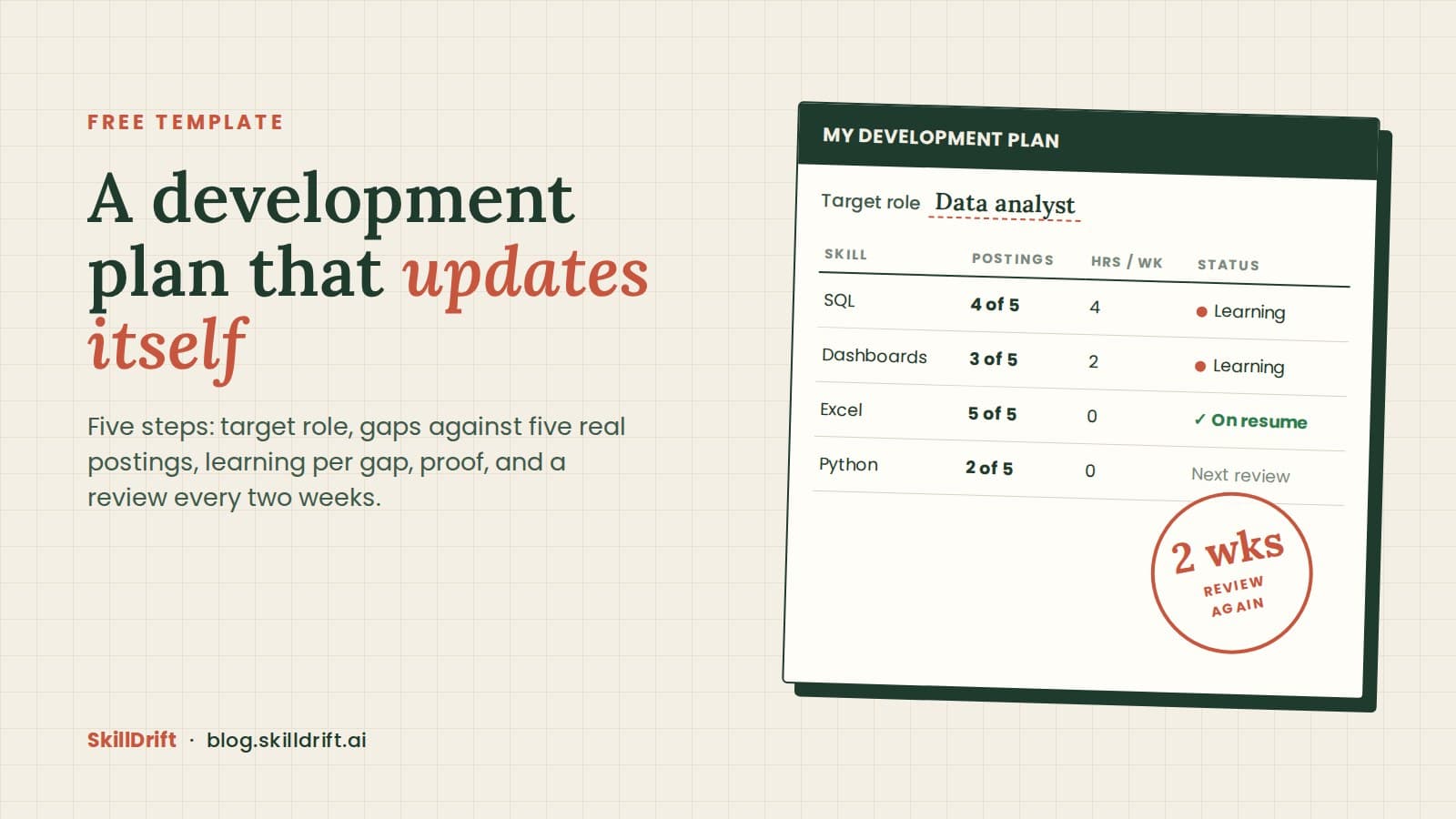
A personal development plan is a short written plan for getting to one target role. It lists the skills that role asks for, what you will learn for each one, how many hours a week you will give it, what you will show as proof, and when you will review it. The plan only works if it changes when the job postings change, so this template has a review column built in.
Make a copy of the free template. It is a Google Sheet. You can fill it in about twenty minutes with five job postings open.
What is a personal development plan?
It is the plan you write for your own career, for the next role you want. HR teams often call the same thing an individual development plan, or a career development plan, when a manager and an employee write it together. The parts are the same in all three. This template is written for one person to use alone, with or without a manager.
Most templates you will find are written for employers. They ask for company competencies and a manager's sign off. This one asks for evidence from the job market instead: what real postings for your target role ask for.
What goes into the template?
The sheet has five steps, one column group each.
- Target role. One job title you could apply for within a year, such as data analyst or product manager. A direction such as "something in tech" is too wide to plan against.
- Gaps against five postings. Open five real postings for that title. List every skill they ask for, count how many of the five ask for it, and mark each one: on my resume, I have it but my resume does not show it, or I do not have it.
- Learning per gap. For each skill in the last group, write what you will learn and how many hours a week you can give it.
- Proof. Write what you will be able to show when you are done: a project, a report, a certificate, a piece of work you can describe without notes.
- Review. A date every two weeks, and a column for what changed.
The sheet carries one filled example row so you can see the level of detail that works.
How do I fill it in?
Start with step 2. It is the step most plans skip, and it decides everything after it.
Sort the skills by how many of the five postings ask for them. A skill that appears in four or five postings belongs to the role. A skill in one posting belongs to one company. Work from the top of that list.
Then look at the middle group, the skills you have but your resume does not show. That group is often bigger than people expect, and it is the fastest win. It is a writing fix. Name the skill in the employer's words and attach it to something you did. How to run a skill gap analysis on yourself covers the three groups in more depth.
For the skills you do not have yet, pick one, or two at most. Several half learned skills do not show on a resume or in an interview. What should I learn next explains how to choose the first one.
How many hours a week should I plan for?
Plan for the hours you can keep every week, even in a busy one. Four steady hours a week finish more than ten hours in the first week and none after. Write the number in the sheet. If a month later you are doing fewer hours than you wrote, change the number. A plan that matches your real week is a plan you will keep.
Why should a development plan update itself?
It should update itself because the target moves. The skills a role asks for change from one quarter to the next. Our own Jobs Index showed it this year: Python passed communication as the most requested skill in job postings within a few weeks. A plan written once in January and opened again in December is a plan for a job market that no longer exists.
So the review step does two things. It checks your progress. It also asks you to open five new postings for the same title and update the counts in step 2. If a new skill appears in most of them, it goes into the plan. If an old one drops away, it comes out.
This is what we call closed loop career development: measure the gap against the role, learn for that gap, prove it, then measure again. The loop closes when the second measurement feeds the next plan. Read how the loop works.
What does SkillDrift do with the same plan?
SkillDrift runs steps 2 to 4 from your resume. It measures your gaps against a target role, a career path or a pasted job description, and scores your job matches out of 100. For a gap you choose, it builds a learning roadmap and lets you set the track (technical, functional or executive), the level (basic, intermediate or advanced) and the hours you can give each week, from two to four hours up to full time. When you finish a roadmap, a short assessment verifies the skill, and the certificate can go on your resume and on LinkedIn.
To see what postings ask for in the role you want, start with skills in demand, by role and industry.
Frequently asked questions
What is the difference between a personal and an individual development plan? The difference is mostly who writes it. An individual development plan is usually written with a manager inside a company. A personal development plan is one you write for yourself. The template works for both.
How long should a development plan cover? Plan the next six to twelve months in detail and review every two weeks. Anything further out changes too much to plan skill by skill.
Should I share my plan with my manager? If your next role is inside your company, yes. Your manager can open doors to the work that becomes your proof.
What if I have less than a year of experience? Use internships and entry level postings for step 2. The method is the same.
Where to start this week
- Make a copy of the template and write down one target role.
- Open five postings for that title and fill step 2.
- Or upload your resume to SkillDrift and let it fill steps 2 to 4 for you.
Prefer your phone? SkillDrift is on Google Play and the Apple App Store.
A plan you review every two weeks is a plan that keeps up with the job you want.